Introduction
Vehicle emissions do not become dangerous in a single instant. The process is gradual. A diesel truck running a slightly rich fuel mixture will show elevated CO readings before its PM2.5 levels cross into dangerous territory. A CNG bus operating in stop-start city traffic will accumulate NOx gradually across a shift, not all at once.
The problem with most fleet monitoring systems is not a lack of sensors. Modern vehicles carry several gas sensors, temperature probes, and air quality detectors. The real problem is that these sensors are treated as independent data points. A system that watches CO in isolation will miss the connection between rising CO and the PM2.5 spike that follows incomplete combustion.
In this project, we did not just build a chart that shows numbers. We built a fleet emission monitoring system called EmissGuard that connects sensor readings across eight vehicles, tracks how emission patterns change over time, and identifies cross-sensor correlations that a single-reading alert would miss. GridDB stores every reading as a time-series record and makes it available for both real-time dashboard queries and machine learning training.
Why Time-Series Databases Matter for Vehicle Emission Data
Imagine a sensor reports an MQ135 reading of 520. Is that a problem?
If the reading was 180 three minutes ago and has been climbing steadily, the vehicle is likely developing a combustion issue that needs immediate attention.
If the reading has been between 490 and 530 for the past two hours, the vehicle may simply be operating under heavy load within its normal emission range for that condition.
A single sensor reading is just a number. A sequence of readings over time tells the actual story.
Fleet vehicles produce a continuous stream of timestamped sensor data. Traditional relational databases were designed for transactional records. They struggle when asked to store thousands of ordered sensor readings per minute and then retrieve the most recent window efficiently.
Time-series databases are built for exactly this type of workload. GridDB stores each sensor reading with its UTC timestamp as the row key. Retrieving the last 30 readings for any vehicle is a single TQL query that returns results in microseconds. This makes it practical to run rolling-window analysis on every poll cycle without putting pressure on the database.
Why GridDB for Fleet Emission Monitoring
Fleet emission monitoring systems need a database that can handle high-frequency sensor ingestion from multiple vehicles simultaneously and return recent readings fast enough for real-time dashboard polling. GridDB is a memory-first NoSQL database built specifically for time-series workloads, which makes it a natural fit for this type of system.
We use GridDB in EmissGuard to:
- Store continuous vehicle sensor data using TIME_SERIES containers with timestamp-based row keys.
- Maintain a fixed schema per vehicle for predictable and fast reads and writes.
- Ingest sensor batches from all eight vehicles in a single multi_put operation.
- Query recent time windows efficiently using TQL for rolling-window health analysis.
- Correlate multiple sensor streams (MQ2, CO, NOx, PM2.5) across time to detect emission patterns.
- Feed stored historical data directly into a scikit-learn machine learning training pipeline.
- Support explainable alerts by giving the dashboard fast access to recent sensor history per vehicle.
Without GridDB:
- Rolling-window AQI analysis would require expensive full scans on every poll cycle.
- Batch ingestion from eight vehicles simultaneously would create write bottlenecks.
- The ML pipeline would have no reliable source of labelled time-series data to train on.
System Architecture
EmissGuard simulates a fleet of eight vehicles across different fuel types and vehicle categories. Each vehicle generates readings from eight sensors at 15-second intervals. The sensor data is generated by a Python simulator, stored in GridDB through a batch insert, and served to a monitoring dashboard through a Flask REST API. The system also detects cross-sensor emission correlations and produces a fleet-wide emission index in addition to per-vehicle AQI scores.
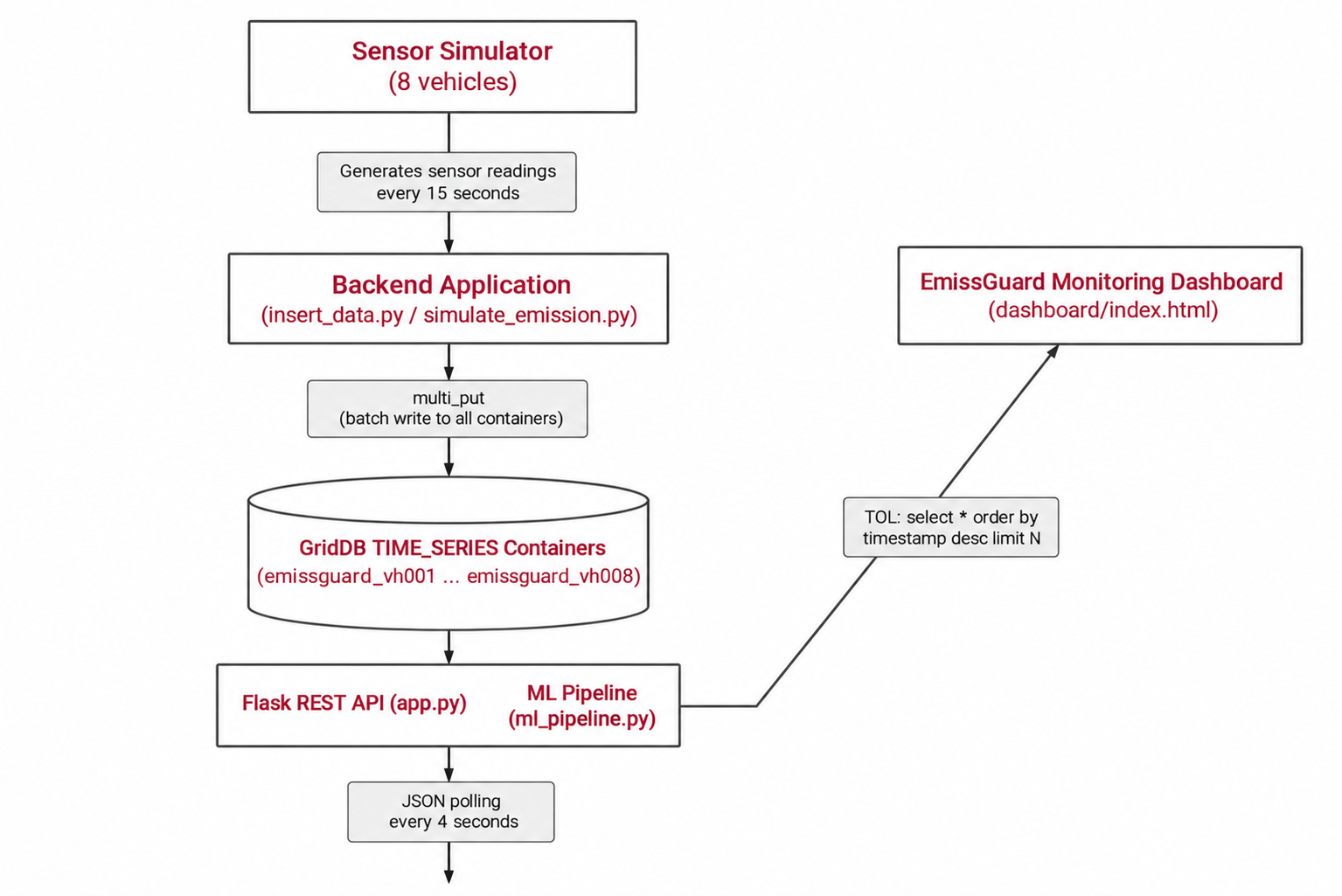
The overall system consists of the following main components:
Sensor Simulation Layer
A Python-based simulator generates sensor readings for all eight vehicles. It produces MQ2, MQ135, CO2, CO, NOx, PM2.5, temperature, and humidity values at regular intervals using proportional interpolation and random noise to simulate how real vehicle sensors behave over time.
Data Ingestion Layer
The backend application receives the simulated readings and writes them into GridDB using the multi_put operation, which batches all eight vehicle containers into a single write request.
GridDB Database
GridDB stores the vehicle sensor data generated during the simulation. It acts as the central data layer from which the application retrieves recent readings when computing AQI scores and emission correlations.
Monitoring Dashboard
A web-based dashboard built with HTML, JavaScript, and Chart.js displays per-vehicle emission status, sensor history charts, fleet-wide emission index, and cross-sensor correlation alerts in real time.
Setting Up GridDB (Local Installation)
EmissGuard uses a locally installed GridDB instance on Ubuntu 24.04. After installing GridDB through the official Ubuntu package and starting the gridstore service, a Python application connects using the notification_member address.
import griddb_python as griddb
import os

NOTIFICATION_MEMBER = os.environ.get("GRIDDB_NOTIFICATION_MEMBER", "127.0.0.1:10001")
CLUSTER_NAME        = os.environ.get("GRIDDB_CLUSTER_NAME",        "myCluster")
USERNAME            = os.environ.get("GRIDDB_USERNAME",            "admin")
PASSWORD            = os.environ.get("GRIDDB_PASSWORD",            "admin")

def get_gridstore():
    factory = griddb.StoreFactory.get_instance()
    return factory.get_store(
        notification_member=NOTIFICATION_MEMBER,
        cluster_name=CLUSTER_NAME,
        username=USERNAME,
        password=PASSWORD,
    )
All connection parameters are read from environment variables so the project runs on any GridDB installation without code changes. The defaults match a standard local setup. Once connected, the application can create containers and begin storing vehicle sensor data.
Project Overview
EmissGuard monitors eight vehicles, each with its own sensor profile, warning thresholds, and GridDB container. The profiles are defined in a central configuration file called vehicles.py, which every other module imports from. This is the single source of truth for sensor ranges, critical thresholds, container names, and vehicle metadata.
VEHICLES = {
    "VH001": {
        "display_name":  "Truck Alpha",
        "vehicle_type":  "Heavy Truck",
        "fuel_type":     "Diesel",
        "container":     "emissguard_vh001",
        "description":   "Long-haul freight truck. Diesel engine, high NOx emitter.",
        "normal": {
            "mq2":         (100, 300),
            "mq135":       (100, 350),
            "co2_ppm":     (400, 600),
            "co_ppm":      (0,   9),
            "nox_ppb":     (10,  80),
            "pm25_ugm3":   (0,   15),
            "temperature": (55,  90),
            "humidity":    (35,  65),
        },
        "thresholds": {
            "mq2":         {"warning": 450,  "critical": 700},
            "mq135":       {"warning": 500,  "critical": 750},
            "co2_ppm":     {"warning": 1000, "critical": 2000},
            "co_ppm":      {"warning": 15,   "critical": 35},
            "nox_ppb":     {"warning": 150,  "critical": 300},
            "pm25_ugm3":   {"warning": 35,   "critical": 75},
            "temperature": {"warning": 120,  "critical": 160},
            "humidity":    {"warning": 80,   "critical": 95},
        },
    },
    # VH002 through VH008 follow the same structure ...
}
Key ideas behind the system:
- Fleet-wide monitoring: Instead of analyzing each vehicle in isolation, the system observes all eight vehicles together and can detect when multiple vehicles show concurrent emission stress.
- Pattern detection: It identifies small but meaningful changes in sensor values over time that may signal a developing combustion issue, rather than reacting only to single-point threshold crossings.
- Cross-sensor correlation awareness: It models how one emission measurement can drive another. High CO often means incomplete combustion, which produces more PM2.5. Rising exhaust temperature promotes NOx formation. These relationships are checked on every analysis cycle.
Simulating Vehicle Sensor Data
Since real vehicle exhaust sensors were not available, the system uses a sensor simulator to generate realistic emission readings. The simulator creates data for eight vehicles across four fuel types: Diesel, Petrol, and CNG.
The dataset is generated in four phases:
- Safe: All vehicles operate within normal emission limits.
- Moderate: VH001 (Truck Alpha) and VH007 (Lorry Eta) begin showing elevated readings.
- Poor: Both heavy vehicles enter the poor zone; VH004 and VH002 enter moderate.
- Dangerous: VH001 and VH007 cross critical thresholds; other vehicles show a cascade of elevated readings.
This models how emission events in real fleets often start with the heaviest vehicles and spread across the fleet through shared operational conditions.
To make the simulation physically realistic, the system avoids generating flat or hardcoded values. Instead it uses proportional interpolation and per-sensor random noise to calculate values dynamically:
def _interpolate(low, high, progress=None):
    """Smoothly interpolate between two values with optional random progress."""
    if progress is None:
        progress = random.uniform(0.0, 1.0)
    return low + progress * (high - low)


def generate_reading(vehicle_id, status="Safe", progress=0.0, timestamp=None):
    cfg = VEHICLES[vehicle_id]
    nrm = cfg["normal"]
    thr = cfg["thresholds"]

    vals = {k: random.uniform(*nrm[k]) for k in nrm}

    noise = {
        "mq2":         random.uniform(-12, 12),
        "mq135":       random.uniform(-12, 12),
        "co2_ppm":     random.uniform(-15, 15),
        "co_ppm":      random.uniform(-0.5, 0.5),
        "nox_ppb":     random.uniform(-4, 4),
        "pm25_ugm3":   random.uniform(-1.5, 1.5),
        "temperature": random.uniform(-2, 2),
        "humidity":    random.uniform(-2, 2),
    }

    if status == "Moderate":
        prog = random.uniform(0.2, 0.55)
        for key in ("mq2", "mq135", "co2_ppm", "co_ppm", "nox_ppb", "pm25_ugm3"):
            vals[key] = _interpolate(nrm[key][1], thr[key]["warning"], prog)

    elif status == "Poor":
        prog = random.uniform(0.45, 0.85)
        for key in ("mq2", "mq135", "co2_ppm", "co_ppm", "nox_ppb", "pm25_ugm3"):
            vals[key] = _interpolate(thr[key]["warning"], thr[key]["critical"], prog * 0.7)

    elif status == "Dangerous":
        prog = random.uniform(0.8, 1.25)
        for key in ("mq2", "mq135", "co2_ppm", "co_ppm", "nox_ppb", "pm25_ugm3"):
            overshoot = thr[key]["critical"] + (
                thr[key]["critical"] - thr[key]["warning"]
            ) * (prog - 1.0) * 0.4
            vals[key] = max(thr[key]["warning"], overshoot)
    # ...
This approach guarantees that simulated sensors drift naturally within a range and occasionally spike, rather than sitting at a fixed median value.
Live Escalation Simulation
To demonstrate how emission events develop over time, the project includes a Python script that simulates a live escalation across the fleet.
Instead of inserting a full dataset all at once, the script gradually sends sensor readings to GridDB to show how emission problems evolve in real vehicle fleets.
The simulation follows four phases:
- Safe Operation: All vehicles emit within normal limits.
- Moderate Escalation: VH001 and VH007 begin showing elevated MQ2 and CO2.
- Poor Condition: Both heavy vehicles enter the poor zone; medium vehicles pick up elevated readings.
- Dangerous Cascade: VH001 and VH007 cross critical thresholds; the fleet emission index climbs sharply.
During the simulation, new sensor readings are continuously inserted into GridDB. This allows the dashboard to react in real time as the escalation develops across vehicles.
A simplified example of the escalation loop is shown below:
def trigger_emission():
    store = insert_data.get_gridstore()
    start_sim()

    i = 0
    while is_sim_active():
        ts    = datetime.now(timezone.utc)
        phase = min(i // 4, 3)
        batch = {}

        for vid, cfg in VEHICLES.items():
            status = PHASE_PLAN[phase].get(vid, "Safe")
            r      = generate_reading(vid, status, timestamp=ts)
            batch[cfg["container"]] = [[
                ts, r["mq2"], r["mq135"], r["co2_ppm"], r["co_ppm"],
                r["nox_ppb"], r["pm25_ugm3"], r["temperature"],
                r["humidity"], r["aqi_status"],
            ]]

        store.multi_put(batch)
        i += 1
        time.sleep(1)
When the operator clicks the “Issue Resolved” button in the dashboard, the backend sets the simulation flag to False. The escalation loop stops and the script injects a final batch of Safe readings into GridDB. These clean readings immediately restore the fleet to a normal state on the dashboard without any manual intervention.
Storing Vehicle Sensor Data in GridDB
After generating the simulated sensor readings, the data is stored in GridDB so the monitoring system can access it. Each vehicle is assigned its own TIME_SERIES container, where readings for all eight sensors are stored with a UTC timestamp as the row key. This allows the system to retrieve vehicle sensor history in chronological order using a single TQL query.
Creating a TIME_SERIES Container
def setup_containers(store):
    for vid, cfg in VEHICLES.items():
        con_info = griddb.ContainerInfo(
            cfg["container"],
            [
                ["timestamp",   griddb.Type.TIMESTAMP],
                ["mq2",         griddb.Type.DOUBLE],
                ["mq135",       griddb.Type.DOUBLE],
                ["co2_ppm",     griddb.Type.DOUBLE],
                ["co_ppm",      griddb.Type.DOUBLE],
                ["nox_ppb",     griddb.Type.DOUBLE],
                ["pm25_ugm3",   griddb.Type.DOUBLE],
                ["temperature", griddb.Type.DOUBLE],
                ["humidity",    griddb.Type.DOUBLE],
                ["aqi_status",  griddb.Type.STRING],
            ],
            griddb.ContainerType.TIME_SERIES,
        )
        store.put_container(con_info)
        print(f"  Container ready: {cfg['container']}")
The put_container call is idempotent. Calling it on an existing container returns a reference to it without losing any stored data. This makes it safe to run insert_data.py multiple times during development and testing.
Inserting Data into GridDB
def insert_dataset(store, dataset):
    batch = {}
    for vid, readings in dataset.items():
        container_name = VEHICLES[vid]["container"]
        rows = []
        for r in readings:
            ts = datetime.fromisoformat(r["timestamp"].replace("Z", "+00:00"))
            rows.append([
                ts,
                r["mq2"], r["mq135"], r["co2_ppm"], r["co_ppm"],
                r["nox_ppb"], r["pm25_ugm3"], r["temperature"],
                r["humidity"], r["aqi_status"],
            ])
        batch[container_name] = rows

    store.multi_put(batch)
The multi_put operation writes rows to multiple containers in a single request. This significantly improves ingestion throughput when handling sensor data from eight vehicles simultaneously.
Querying Sensor Data and Computing AQI Scores
Once vehicle sensor data is stored in GridDB, the monitoring system queries recent readings to evaluate each vehicle’s emission status. The system retrieves the latest records for each vehicle and computes an AQI score based on how far the sensor values have drifted from normal ranges.
GridDB’s Time-Series Query Language (TQL) allows the system to fetch the most recent readings from each vehicle container efficiently:
def query_recent(store, vehicle_id, limit=30):
    container = store.get_container(VEHICLES[vehicle_id]["container"])

    query = container.query(
        f"select * order by timestamp desc limit {limit}"
    )
    rs = query.fetch()

    readings = []
    while rs.has_next():
        row = rs.next()
        readings.append({
            "timestamp":   row[0].isoformat(),
            "mq2":         row[1],
            "mq135":       row[2],
            "co2_ppm":     row[3],
            "co_ppm":      row[4],
            "nox_ppb":     row[5],
            "pm25_ugm3":   row[6],
            "temperature": row[7],
            "humidity":    row[8],
            "aqi_status":  row[9],
        })
    return readings
To prevent sudden status changes caused by a single noisy sensor reading, the system evaluates vehicle conditions using a rolling window of the five most recent readings. Averaging the latest five values makes the monitoring logic stable and resistant to temporary spikes:
window = readings[:5]

avgs = {
    k: sum(r[k] for r in window) / len(window)
    for k in ("mq2","mq135","co2_ppm","co_ppm","nox_ppb","pm25_ugm3","temperature","humidity")
}
AQI Risk Scoring
Instead of a simple status label, each vehicle receives a continuous AQI score from 0 to 100 based on exactly how far its sensor values have drifted from safe ranges. A vehicle with CO at 18 ppm (just above the 15 ppm warning threshold) and a vehicle with CO at 40 ppm (past the 35 ppm critical threshold) both count as elevated in a simple threshold system. With continuous scoring, the second vehicle scores significantly higher because its readings are more serious.
def sensor_severity(value, normal_max, warning, critical):
    if value <= normal_max:
        return 0.0
    elif value <= warning:
        return 0.30 * (value - normal_max) / max(warning - normal_max, 1e-9)
    elif value <= critical:
        return 0.30 + 0.70 * (value - warning) / max(critical - warning, 1e-9)
    else:
        return min(1.0 + ((value - critical) / max(abs(critical - warning), 1e-9)) * 0.5, 1.5)


def vehicle_aqi_score(vehicle_id, avgs):
    thr = VEHICLES[vehicle_id]["thresholds"]
    nrm = VEHICLES[vehicle_id]["normal"]

    scores = {
        "mq2":       sensor_severity(avgs["mq2"],       nrm["mq2"][1],       thr["mq2"]["warning"],       thr["mq2"]["critical"]),
        "mq135":     sensor_severity(avgs["mq135"],     nrm["mq135"][1],     thr["mq135"]["warning"],     thr["mq135"]["critical"]),
        "co2_ppm":   sensor_severity(avgs["co2_ppm"],   nrm["co2_ppm"][1],   thr["co2_ppm"]["warning"],   thr["co2_ppm"]["critical"]),
        "co_ppm":    sensor_severity(avgs["co_ppm"],    nrm["co_ppm"][1],    thr["co_ppm"]["warning"],    thr["co_ppm"]["critical"]),
        "nox_ppb":   sensor_severity(avgs["nox_ppb"],   nrm["nox_ppb"][1],   thr["nox_ppb"]["warning"],   thr["nox_ppb"]["critical"]),
        "pm25_ugm3": sensor_severity(avgs["pm25_ugm3"], nrm["pm25_ugm3"][1], thr["pm25_ugm3"]["warning"], thr["pm25_ugm3"]["critical"]),
    }
    weighted = sum(scores[k] * SENSOR_WEIGHTS[k] for k in SENSOR_WEIGHTS)
    return min(round(weighted * 100), 100)
The fleet-wide emission index is a weighted average across all eight vehicles. Heavier diesel vehicles like VH001 and VH007 carry higher weights because their emissions have a greater impact on the overall fleet footprint. Active emission correlations add a penalty of 8 points each, up to a maximum of 25 additional points.
Emission Correlation Detection
The system understands that emission sensors are chemically connected. Elevated CO usually indicates incomplete combustion, which produces more particulate matter. High exhaust temperature drives NOx formation. These relationships are defined as rules in vehicles.py:
EMISSION_RULES = [
    {
        "source":  "co_ppm",
        "target":  "pm25_ugm3",
        "message": (
            "Incomplete Combustion: Elevated CO is correlated with rising PM2.5. "
            "Rich fuel mixture may be causing unburnt particulate matter in exhaust."
        ),
    },
    {
        "source":  "temperature",
        "target":  "nox_ppb",
        "message": (
            "Thermal NOx Formation: High exhaust temperature is correlated with "
            "elevated NOx levels. High-temperature combustion promotes nitrogen oxide formation."
        ),
    },
    {
        "source":  "mq2",
        "target":  "co2_ppm",
        "message": (
            "Rich Mixture Alert: High MQ2 reading is correlated with elevated CO2. "
            "Fuel-rich combustion detected."
        ),
    },
]
When a vehicle’s source sensor is in a Poor or Dangerous state, a correlation alert is raised on the dashboard showing which secondary sensor is likely to be affected next.
Continuous Telemetry Stream
In addition to inserting the initial dataset, the system supports a background heartbeat producer that continuously sends Safe readings to GridDB every five seconds. This keeps the dashboard feed alive with fresh data between simulation runs.
python insert_data.py --liveWhen the emission simulation is triggered, the producer can be left running. Its Safe readings will be overwritten by the simulation’s escalating data during the active simulation window. Once the simulation ends and the Issue Resolved button is clicked, the system injects a recovery batch of Safe readings and the dashboard returns to a clean state immediately.
Building the Monitoring Dashboard
The EmissGuard dashboard is a single HTML file served directly by the Flask application. It uses Chart.js for time-series visualization and polls the backend API every four seconds. The interface displays per-vehicle emission cards, AQI score bars, sensor history charts across three tab panels, emission correlation alerts, and a fleet-wide escalation timeline.
The backend exposes a set of simple API endpoints that the dashboard polls periodically:
| Endpoint | What it returns |
|---|---|
| GET /api/fleet | Status of all vehicles + correlations + emission index |
| GET /api/vehicle/<id> | Sensor history for one vehicle (used for charts) |
| GET /api/stats/<id> | Min, max, and average per sensor over recent history |
| GET /api/timeline | Log of emission status-change events |
| GET /api/latest | Single most recent reading per vehicle |
Below is a simplified example of how the dashboard fetches fleet data and updates the interface:
async function pollFleet() {
    try {
        const res  = await fetch('/api/fleet');
        const data = await res.json();

        updateStrip(data);
        buildSidebar(data);
        updateCorr(data);

        if (!selectedVid) buildCards(data);

        document.getElementById('lastTs').textContent =
            new Date().toLocaleTimeString('en-IN', {hour12: false});

    } catch(e) {
        console.warn('Poll error:', e);
    }
}
The complete implementation can be found in the project repository.
The dashboard calls the fleet endpoint every four seconds to stay synchronized with the latest vehicle data stored in GridDB. The vehicle detail view fetches sensor history from /api/vehicle/<id> and renders eight Chart.js line charts across three tabs: Primary Sensors (MQ2 and MQ135), Emission Gases (CO2, CO, NOx, PM2.5), and Temperature plus Humidity.
Running the Project
Make sure GridDB is running and credentials are configured as environment variables. Then run the following in order:
# Step 1: Create containers and seed historical data (1,480 rows across 8 vehicles)
python src/insert_data.py

# Step 2: Verify that data was stored correctly
python src/query_data.py

# Step 3: Start the monitoring backend and dashboard
python src/app.py

# Step 4 (optional): Keep the dashboard alive with a live heartbeat
python src/insert_data.py --live

# Step 5 (optional): Trigger a live escalation demonstration
python src/simulate_emission.py
Open http://localhost:5050 to view the EmissGuard dashboard.
The project uses two separate data-feeding mechanisms to make the demonstration repeatable:
The Background Heartbeat (insert_data.py –live): This script provides a stable Safe baseline so the dashboard stays active and shows green status by default.
The Manual Escalation (simulate_emission.py): This script temporarily takes over with a four-phase emission event to show how pollution builds across the fleet.
One of the practical advantages of using GridDB here is the automatic recovery behavior. Once the escalation script finishes and the operator clicks Issue Resolved, the background producer continues sending Safe data. These new clean readings overwrite the elevated values in the rolling window and the dashboard returns to a normal state without requiring any manual reset.
Results and Dashboard Overview
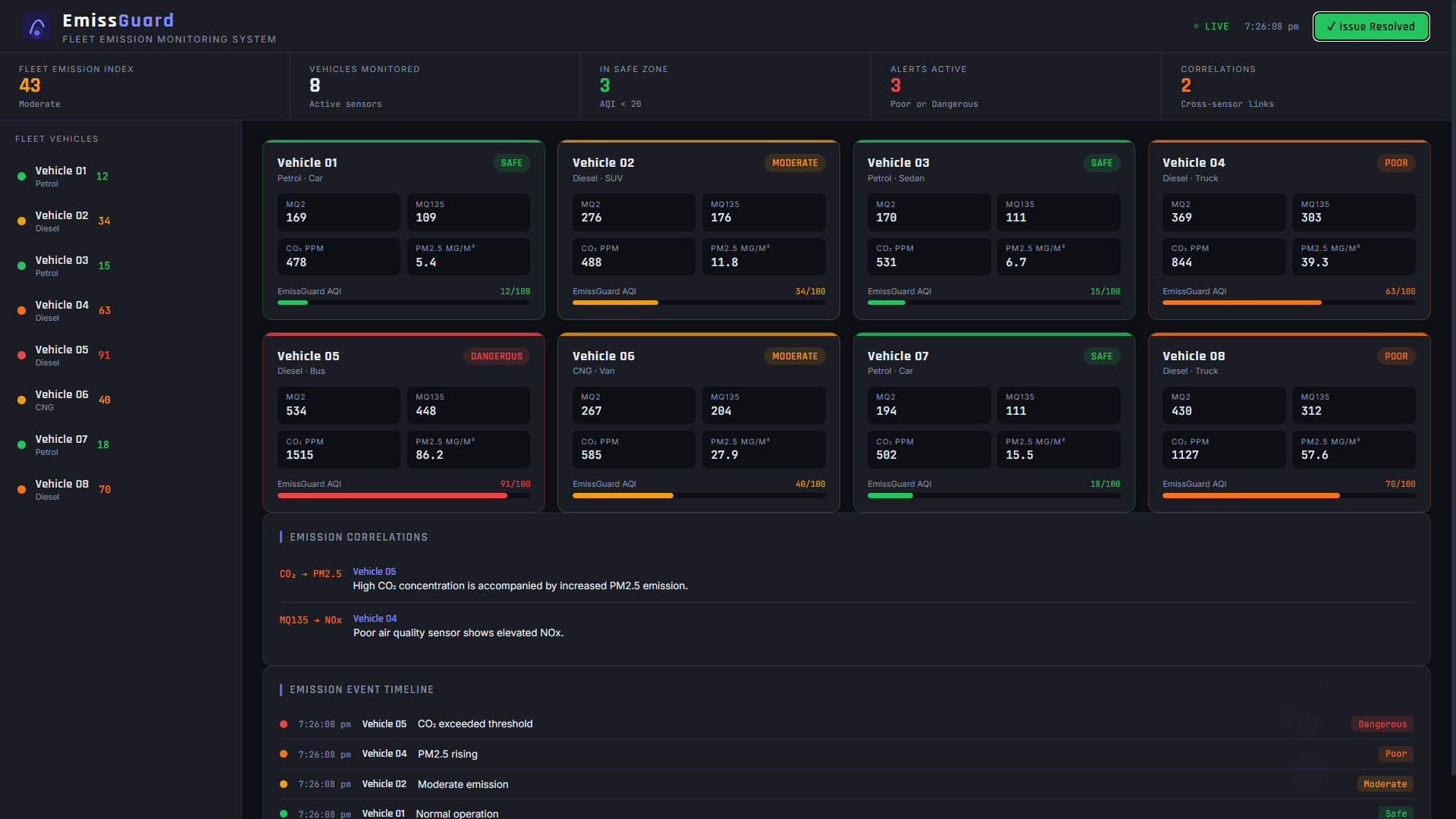
After running the system, the EmissGuard dashboard displays the real-time emission status of all eight vehicles. The interface shows sensor readings for MQ2, MQ135, CO2, and PM2.5 on the fleet card view, along with the AQI score and current status badge for each vehicle.
Safe Operation
In the safe state, all eight vehicles operate within their normal emission ranges. The dashboard displays a low fleet emission index and all vehicle cards show a green Safe badge. The emission correlation panel shows no active alerts.
Moderate and Poor Conditions
As the simulation advances, VH001 and VH007 begin showing elevated readings. The dashboard updates their status badges to Moderate and then Poor. The fleet emission index rises as the weighted average reflects the degrading sensor values. When two or more sensors on a vehicle cross their warning thresholds simultaneously, the system detects an emission correlation and displays it in the correlation panel with a description of the likely chemical cause.
Dangerous Cascade
When VH001 and VH007 enter the Dangerous state, the fleet emission index climbs sharply. The correlation panel shows multiple active alerts. The escalation timeline at the bottom of the dashboard logs every status-change event with a timestamp, vehicle name, and fuel type. The operator can click Issue Resolved to inject recovery data and watch the system return to normal in real time.
Vehicle Detail View
Clicking any vehicle card opens a detail panel with four summary statistics (AQI score, average CO2, average CO, and maximum PM2.5) and eight Chart.js line charts organized across three tabs. The charts render up to 200 historical readings pulled from GridDB through the /api/vehicle/<id> endpoint, giving a clear picture of how each sensor has behaved over the monitored period.
Conclusion
Vehicle emissions do not usually become a problem at a single moment in time. The readings build gradually. A system that only checks whether a value is above a fixed threshold today will miss the trend that has been developing over the past ten minutes.
In this project, we built EmissGuard, a fleet emission monitoring prototype using GridDB to store and query vehicle sensor data. By combining simulated multi-sensor readings with rolling-window analysis, weighted AQI scoring, and cross-sensor correlation rules, the system can detect early emission patterns before individual sensors cross their critical thresholds.
GridDB TIME_SERIES containers, the multi_put batch ingestion operation, and TQL time-window queries made it straightforward to build a system that ingests data from eight vehicles simultaneously, analyzes it on every poll cycle, and feeds it into an ML training pipeline, all from a simple Python codebase with no external dependencies beyond the GridDB client and Flask.
The complete implementation can be found in the project repository: github.com/DoneByManthan/GridDB-EmissGuard
In the future, this approach could be extended with anomaly detection models trained on the historical GridDB data to identify unusual emission signatures that do not fit any predefined rule.
Per-vehicle baseline learning, where the system builds a personal normal profile from the first week of data for each vehicle, would make the threshold system more accurate for mixed fleets where different vehicles have genuinely different operating profiles. Integration with real OBD-II sensor hardware would allow the same codebase to transition from simulation to production monitoring without changes to the GridDB storage or analysis layers.